Dinner needs cooking. Someone is tired. A familiar song buys a few minutes to breathe. Screens have a place in real family life, and using one doesn’t make you a bad parent.
The harder question is what happens after the video we chose. Another song starts. A brighter thumbnail appears. A short break becomes a long session, and switching it off becomes the hardest part of the afternoon.
This note is about making those moments more manageable: choosing content deliberately, giving viewing a clear ending, and keeping parents in charge of the next video.
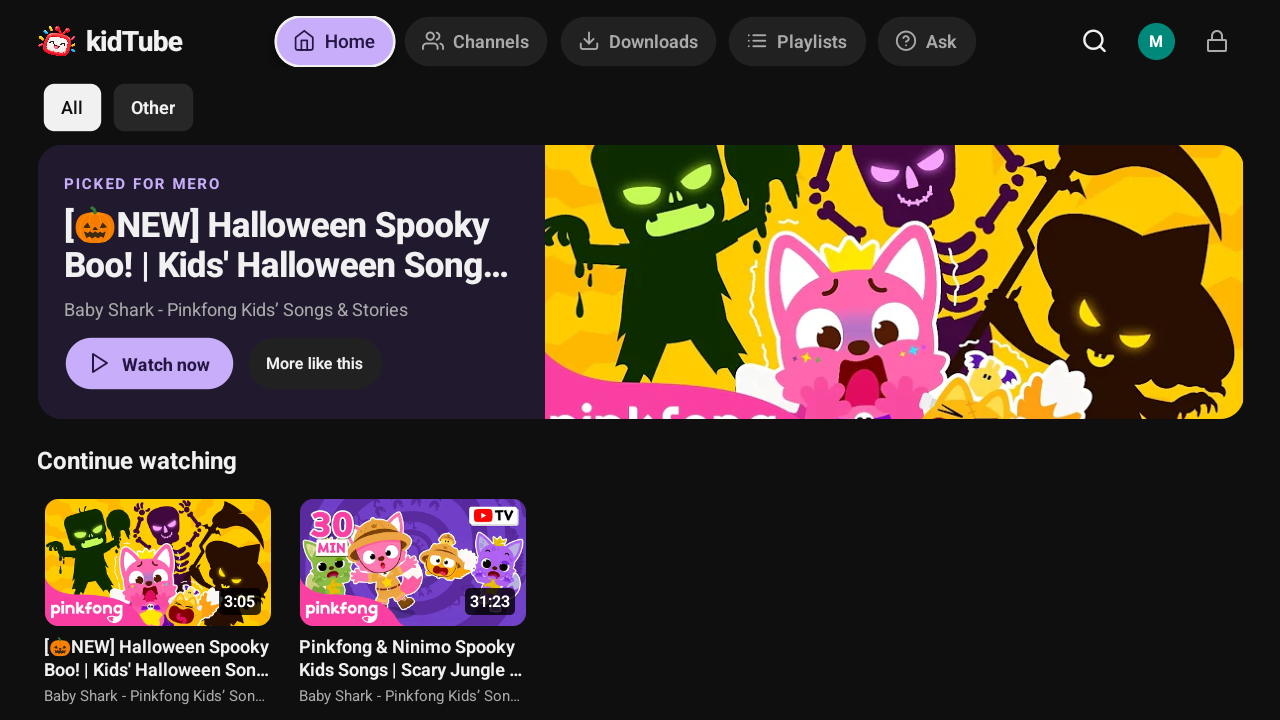
A little transparency: kidTube is our own family project. The screenshots here come from its repository and were captured on 13 October 2026. This is an introduction to what we built, alongside independently sourced screen-time guidance. The TV screenshot above shows an existing demo library, not our recommended viewing list; thumbnails belong to their creators.
“Brainrot” describes a feeling, not a diagnosis
Parents often use brainrot for an endless stream of loud clips, repetitive jokes and videos that seem to leave little behind. It is internet slang, not a medical condition. A child loving a song, or protesting when it stops, doesn’t establish addiction or brain damage.
There is still a sensible concern underneath the word. The American Academy of Pediatrics’ 2026 media guidance describes how many platforms prioritise engagement and profit. It calls for safer defaults, including turning off autoplay and offering ways to disable algorithmic feeds.
A social feed or video recommendation system can keep offering something new without knowing whether your child needs lunch, outdoor play or sleep. An engaging video isn’t automatically a useful video, and a toddler cannot be expected to manage that boundary alone.
Our practical response is to decide three things before pressing play: what to watch, how much to watch, and what comes afterwards.
How much screen time is a useful starting point?
For sedentary screen time, the WHO’s under-five guidelines recommend:
- Under 2: screen viewing is not recommended for infants or one-year-olds.
- Ages 2–4: no more than one hour a day; less is better.
An hour is a ceiling, not a daily target. It includes viewing across devices, not an hour on each app. These are WHO recommendations for sedentary screen use; they aren’t a blanket rule for every kind of digital interaction or for children five and older.
For school-age children, make a family plan that protects sleep, movement, schoolwork and relationships. The AAP’s current guidance also asks families to consider the child, the content, calming habits, what media crowds out and communication.
A useful check at home: is viewing pushing something else aside? Is there still time for books, conversation, active play and boredom that turns into an idea?
CoComelon and channels we’d limit or preview carefully
This is an editorial shortlist, not a medical blacklist. The concerns below apply to particular formats, not every upload. We haven’t audited every video or measured these channels’ effects on children. Preview the actual selection, especially when approving a whole channel.
CoComelon: choose one song rather than an open-ended session
CoComelon describes its approach as learning through music, repetition and familiar routines. Those can be useful ingredients. Our concern is using an immersive animated song stream as the default activity, particularly long compilations with few obvious stopping points.
If your child becomes absorbed in the changing visuals and wants the next song immediately, try a single selected song, sing it together, then repeat it away from the screen. We would limit extended sessions for toddlers rather than assume the educational label makes any duration helpful.
There isn’t evidence here to claim that CoComelon specifically causes ADHD, damages the brain or creates clinical addiction. Intensity and difficulty stopping are reasons to reconsider the viewing setup, not diagnoses.
Little Angel: preview the song and its message
Moonbug describes Little Angel as a large catalogue of 3D animated songs and episodes, with educational specialists contributing to preschool lessons. That description doesn’t tell a parent whether an individual video fits their child.
We would avoid giving a toddler unrestricted access to the catalogue. Check whether the selected song models behaviour you want to encourage, whether its sound and action feel comfortable, and whether it has a clear end. Choose a short video with one useful theme over a long song marathon.
Ryan’s World: skip toy-led videos when you want a calmer break
The Ryan’s World website prominently connects the brand with toys, merchandise and commercial collaborations. That makes toy-led entertainment a less useful default when your goal is a short break without shopping prompts.
For preschool and early-primary children, we would limit unboxing and product-focused selections. If you choose one, talk about the difference between enjoying a video and needing to own what appears in it. A science or story video should be judged separately from an unboxing.
Anonymous cartoon compilations and character mashups: leave them out
A familiar character on a thumbnail doesn’t establish who made the video or what happens later. We’d leave out uploads with unclear ownership, misleading titles, frightening mashups or content that changes unexpectedly. Use the official creator’s links and review the video before adding it.
The filter matters more than a permanent list of “bad” brands: clear purpose, suitable content, manageable intensity and a definite ending.
Better starting choices, with ages and reasons
The ages below are suggested viewing fits, not a recommendation to introduce screens at that age or a guarantee that every upload is suitable. Daniel Tiger’s 2–4 range comes from PBS; the other ranges are our practical starting points. Check official links, local availability and individual videos. Educational quality and quiet pacing are separate qualities: even a good channel can include lively songs and long compilations.
Super Simple Songs — roughly ages 2–5
Its creators explain that the songs grew from teachers simplifying music for young English learners. Clear language, repetition and gestures make selected songs useful for singing and moving together. Start with a short song about colours, counting or a routine, then practise it during play. Choose individual songs rather than treating the entire channel as equally calm.
Caitie’s Classroom / Super Simple Play — roughly ages 3–6
Caitie’s Classroom connects songs with crafts, creative play and field trips. We like the opportunity to turn a video into something a child can do: make a simple craft, look for a leaf or explore a sound. Pick a shorter segment when a full episode exceeds your planned viewing time.
Daniel Tiger’s Neighborhood — ages 2–4
PBS describes Daniel Tiger as a preschool series built around a social-emotional curriculum. Its stories and strategy songs give families language for disappointment, waiting and other everyday challenges. Pick an episode related to something your child is experiencing, then revisit the strategy together afterwards.
Sesame Street — roughly ages 3–5
Sesame Workshop’s curriculum addresses early learning and children’s social and emotional needs. Selected clips about feelings, letters or numbers give you a clear topic to talk about together. Sesame Street can be energetic, so use the learning goal and your child’s response to guide your choice rather than assuming it is always low stimulation.
Storyline Online — roughly ages 4–8, depending on the book
Storyline Online features actors reading children’s books, with illustrations and educator-developed activities. A complete story offers a natural stopping point and something to discuss. Preview the book’s themes, choose one that suits your child, and borrow the physical book if they want to return to it.
What Pinterest and Instagram lists can help with
Searching surfaced Pinterest recommendations for low-stimulation shows, including material shared from Instagram. Direct access to the Instagram posts was limited, so we haven’t treated those posts as verified evidence.
These lists can be a useful way to discover a title. “Low stimulation” is an informal description, though, not a standardised medical rating. Before saving a recommendation, ask who created the list, whether it points to an official video, and whether its claims are backed by more than a caption.
Watch a sample yourself. Does it allow time to follow an idea? Does it encourage participation? Is the tone comfortable for your child? Can you stop at the end of one story or song? A muted colour palette alone doesn’t answer those questions.
Why we built kidTube
We wanted a small video library where parents choose the content and set boundaries. kidTube is an Android app that plays approved YouTube videos inside a parent-managed library.

Parents can approve individual videos or channels, create playlists and set different rules for each child. The child’s library has no unrestricted search or algorithmic recommendations. Children can ask for new content, but it stays unavailable until a parent approves it.
Daily viewing limits, allowed hours, bedtime rules and an autoplay setting help make the family plan consistent. Queues stop at the end, and parents can keep autoplay off. Activity history shows what each child watched and for how long.

kidTube keeps settings and watch history on the device; streaming still needs network access. It currently supports Android, including Android TV. It’s an independent project, unaffiliated with YouTube or Google, and video playback depends on YouTube’s public endpoints.
Its controls apply inside kidTube. It doesn’t restrict other apps or the whole device, and it doesn’t replace adult judgement about content. If a child can open another video app, use device-level controls too. You can read the project before deciding whether it fits your family.
Download kidTube for Android — open the GitHub releases page and download app-release.apk from the release assets.
A small routine to try this week
- Choose a small library. Start with a few individual songs or stories you’ve previewed. Approve whole channels only when you’re comfortable reviewing future uploads too.
- Give the session an ending. Say “one story, then snack” before starting. Keep autoplay off and choose a session that fits within the day’s overall plan.
- Join in when you can. Sing, answer a question or talk about a character. Bring one idea into real play afterwards.
- Help with the transition. Give a warning, acknowledge disappointment and have the next activity ready. A timer can enforce a boundary; a child may still need help with their feelings.
- Notice the pattern. If viewing repeatedly displaces sleep or play, or stopping causes persistent difficulties, revisit the routine and seek advice from your child’s health professional.
Keep an easy alternative nearby: books, crayons, blocks, or something from our quiet-play ideas. The aim is a viewing habit with enough space around it for the rest of childhood.